InsuraConnect Developer Guide
Acknowledgements
The undo and redo features were adapted from AB4
Setting up, getting started
Refer to the guide Setting up and getting started.
Design
Architecture
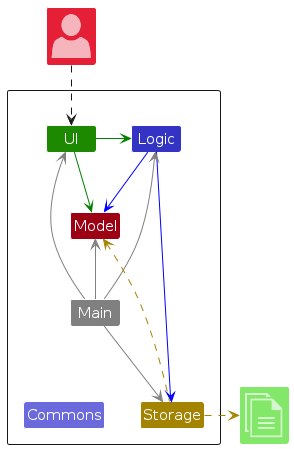
The Architecture Diagram given above explains the high-level design of the App.
Given below is a quick overview of main components and how they interact with each other.
Main components of the architecture
Main (consisting of classes Main and MainApp) is in charge of the app launch and shut down.
- At app launch, it initializes the other components in the correct sequence, and connects them up with each other.
- At shut down, it shuts down the other components and invokes cleanup methods where necessary.
The bulk of the app's work is done by the following four components:
UI: The UI of the App.Logic: The command executor.Model: Holds the data of the App in memory.Storage: Reads data from, and writes data to, the hard disk.
Commons represents a collection of classes used by multiple other components.
How the architecture components interact with each other
The Sequence Diagram below shows how the components interact with each other for the scenario where the user issues the command delete 1.
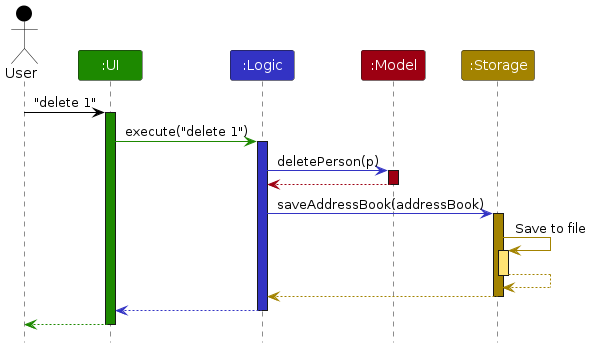
Each of the four main components (also shown in the diagram above),
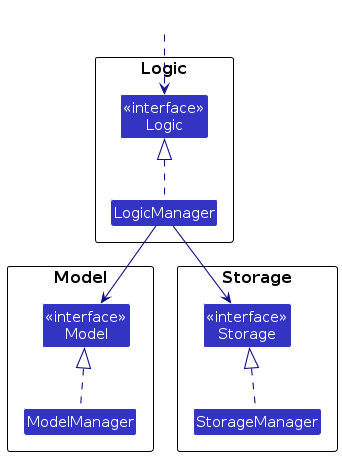
- defines its API in an
interfacewith the same name as the Component. - implements its functionality using a concrete
{Component Name}Managerclass (which follows the corresponding APIinterfacementioned in the previous point.
For example, the Logic component defines its API in the Logic.java interface and implements its functionality using the LogicManager.java class which follows the Logic interface. Other components interact with a given component through its interface rather than the concrete class (reason: to prevent outside component's being coupled to the implementation of a component), as illustrated in the (partial) class diagram below.
The sections below give more details of each component.
UI component
The API of this component is specified in Ui.java
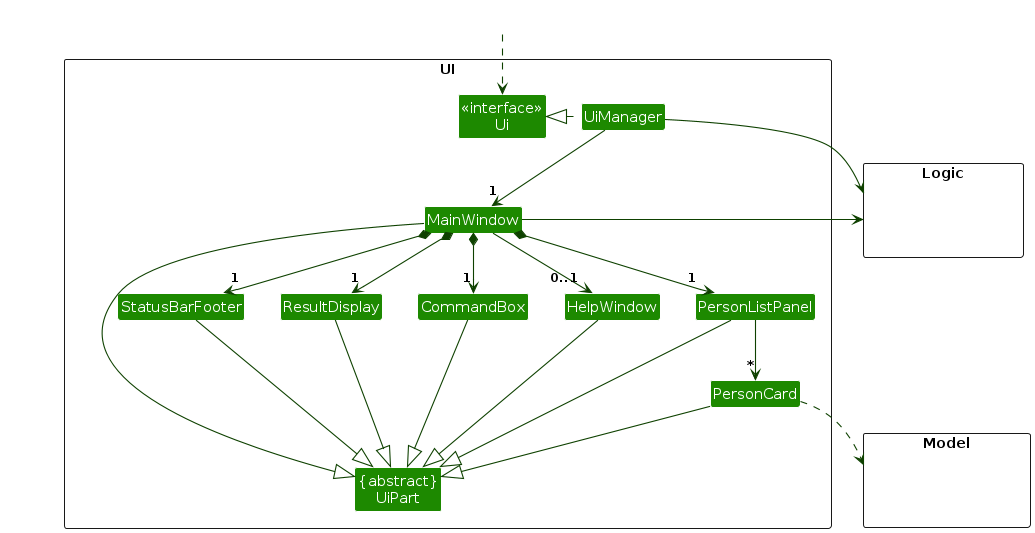
The UI consists of a MainWindow that is made up of parts e.g.CommandBox, ResultDisplay, PersonListPanel, StatusBarFooter etc. All these, including the MainWindow, inherit from the abstract UiPart class which captures the commonalities between classes that represent parts of the visible GUI.
The UI component uses the JavaFx UI framework. The layout of these UI parts are defined in matching .fxml files that are in the src/main/resources/view folder. For example, the layout of the MainWindow is specified in MainWindow.fxml
The UI component,
- executes user commands using the
Logiccomponent. - listens for changes to
Modeldata so that the UI can be updated with the modified data. - keeps a reference to the
Logiccomponent, because theUIrelies on theLogicto execute commands. - depends on some classes in the
Modelcomponent, as it displaysPersonobject residing in theModel.
Logic component
API : Logic.java
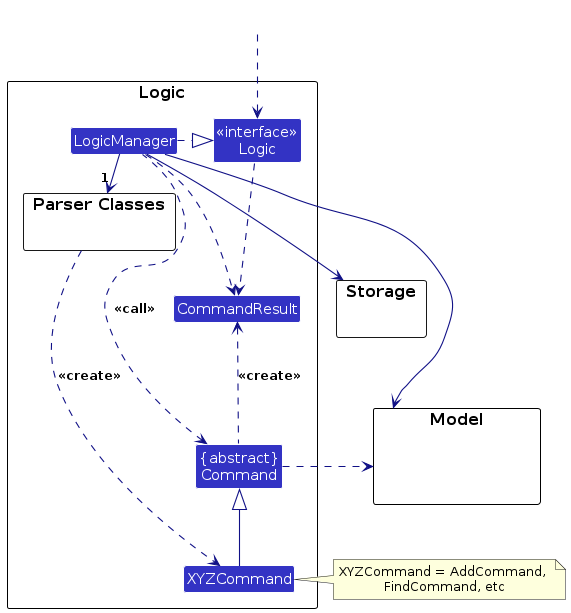
Here's a (partial) class diagram of the Logic component:
The sequence diagram below illustrates the interactions within the Logic component, taking execute("delete 1") API call as an example.
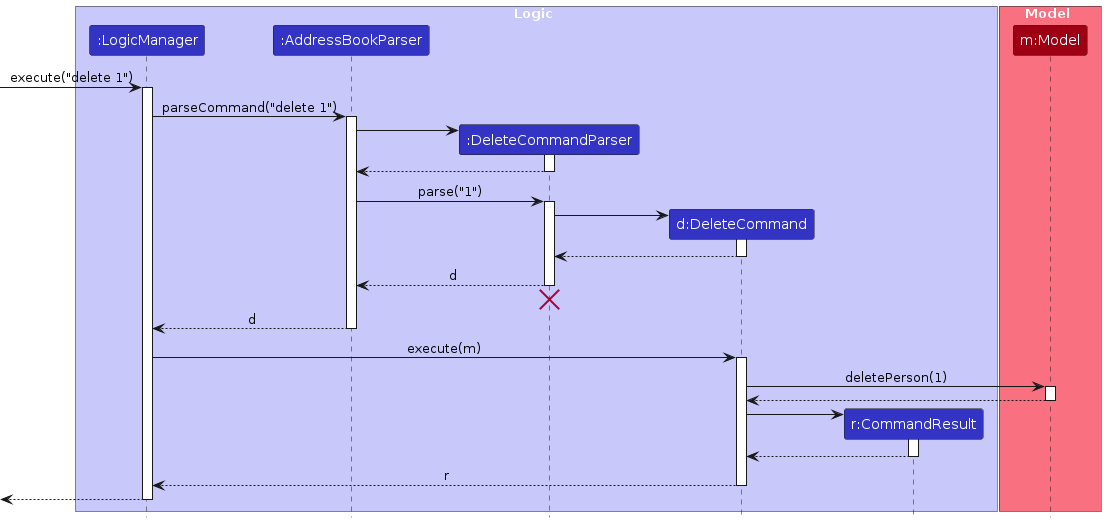
Note: The lifeline for DeleteCommandParser should end at the destroy marker (X) but due to a limitation of PlantUML, the lifeline continues till the end of diagram.
How the Logic component works:
- When
Logicis called upon to execute a command, it is passed to anAddressBookParserobject which in turn creates a parser that matches the command (e.g.,DeleteCommandParser) and uses it to parse the command. - This results in a
Commandobject (more precisely, an object of one of its subclasses e.g.,DeleteCommand) which is executed by theLogicManager. - The command can communicate with the
Modelwhen it is executed (e.g. to delete a person).
Note that although this is shown as a single step in the diagram above (for simplicity), in the code it can take several interactions (between the command object and theModel) to achieve. - The result of the command execution is encapsulated as a
CommandResultobject which is returned back fromLogic.
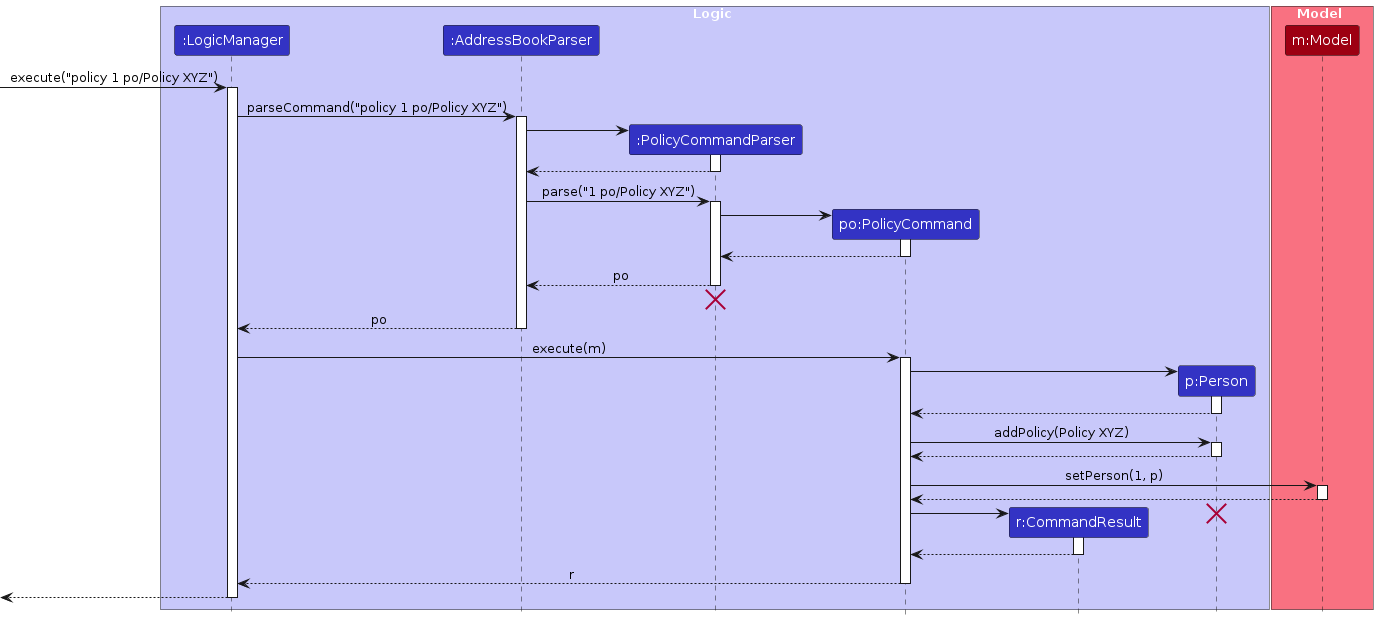
The sequence diagram below illustrates the interactions within the Logic component, taking execute("policy 1 po/Policy XYZ") API call as an example.
Here are the other classes in Logic (omitted from the class diagram above) that are used for parsing a user command:
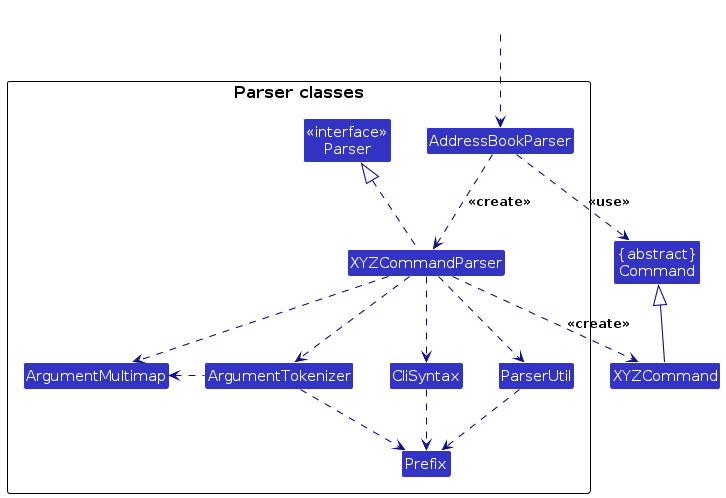
How the parsing works:
- When called upon to parse a user command, the
AddressBookParserclass creates anXYZCommandParser(XYZis a placeholder for the specific command name e.g.,AddCommandParser) which uses the other classes shown above to parse the user command and create aXYZCommandobject (e.g.,AddCommand) which theAddressBookParserreturns back as aCommandobject. - All
XYZCommandParserclasses (e.g.,AddCommandParser,DeleteCommandParser, ...) inherit from theParserinterface so that they can be treated similarly where possible e.g, during testing.
Model component
API : Model.java
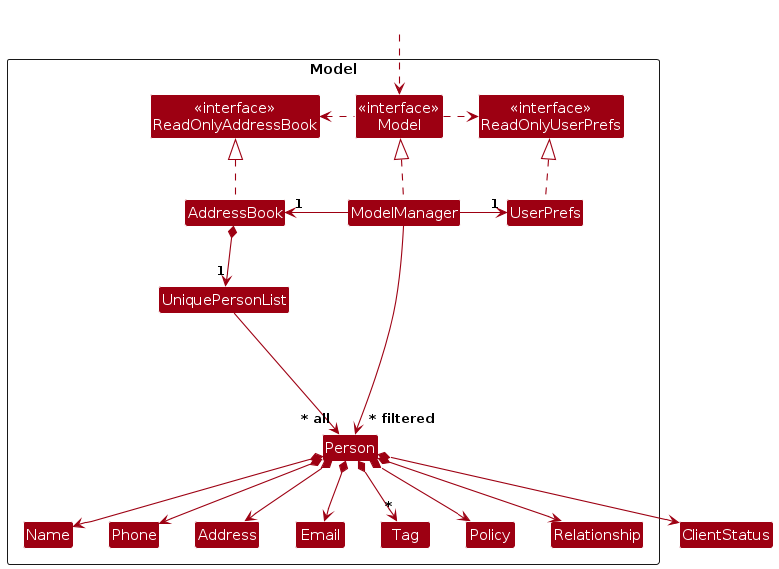
The Model component,
- stores the address book data i.e., all
Personobjects (which are contained in aUniquePersonListobject). - stores the currently 'selected'
Personobjects (e.g., results of a search query) as a separate filtered list which is exposed to outsiders as an unmodifiableObservableList<Person>that can be 'observed' e.g. the UI can be bound to this list so that the UI automatically updates when the data in the list change. - stores a
UserPrefobject that represents the user’s preferences. This is exposed to the outside as aReadOnlyUserPrefobjects. - does not depend on any of the other three components (as the
Modelrepresents data entities of the domain, they should make sense on their own without depending on other components)
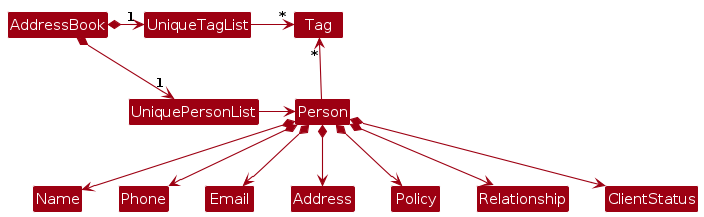
Note: An alternative (arguably, a more OOP) model is given below. It has a Tag list in the AddressBook, which Person references. This allows AddressBook to only require one Tag object per unique tag, instead of each Person needing their own Tag objects.
Storage component
API : Storage.java
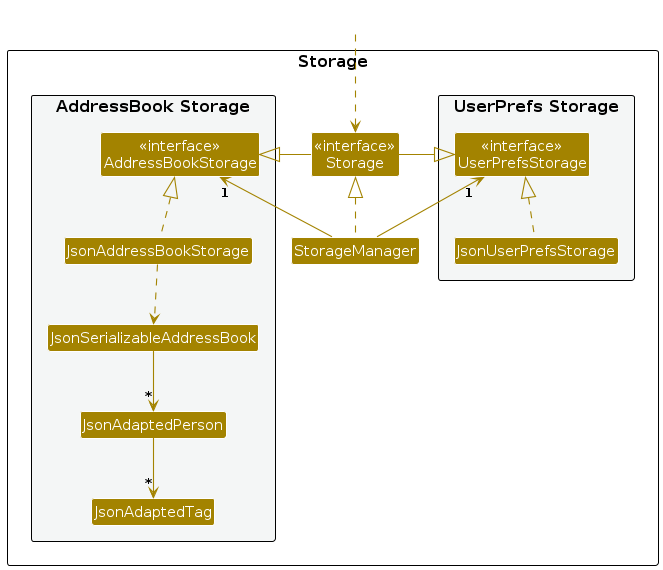
The Storage component,
- can save both address book data and user preference data in JSON format, and read them back into corresponding objects.
- inherits from both
AddressBookStorageandUserPrefStorage, which means it can be treated as either one (if only the functionality of only one is needed). - depends on some classes in the
Modelcomponent (because theStoragecomponent's job is to save/retrieve objects that belong to theModel)
Common classes
Classes used by multiple components are in the seedu.addressbook.commons package.
Implementation
This section describes some noteworthy details on how certain features are implemented.
Undo/redo feature
Implementation
The undo/redo mechanism is facilitated by VersionedAddressBook. It extends AddressBook with an undo/redo history, stored internally as an addressBookStateList and currentStatePointer. Additionally, it implements the following operations:
VersionedAddressBook#commit()— Saves the current address book state in its history.VersionedAddressBook#undo()— Restores the previous address book state from its history.VersionedAddressBook#redo()— Restores a previously undone address book state from its history.
These operations are exposed in the Model interface as Model#commitAddressBook(), Model#undoAddressBook() and Model#redoAddressBook() respectively.
Given below is an example usage scenario and how the undo/redo mechanism behaves at each step.
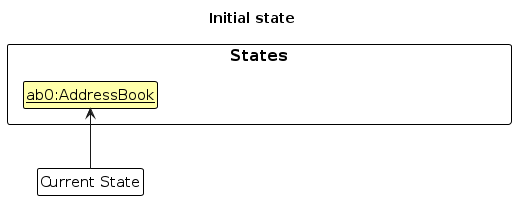
Step 1. The user launches the application for the first time. The VersionedAddressBook will be initialized with the initial address book state, and the currentStatePointer pointing to that single address book state.
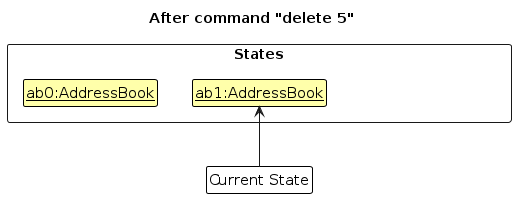
Step 2. The user executes delete 5 command to delete the 5th person in the address book. The delete command calls Model#commitAddressBook(), causing the modified state of the address book after the delete 5 command executes to be saved in the addressBookStateList, and the currentStatePointer is shifted to the newly inserted address book state.
Step 3. The user executes add n/David … to add a new person. The add command also calls Model#commitAddressBook(), causing another modified address book state to be saved into the addressBookStateList.
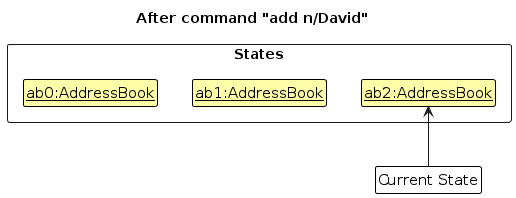
Note: If a command fails its execution, it will not call Model#commitAddressBook(), so the address book state will not be saved into the addressBookStateList.
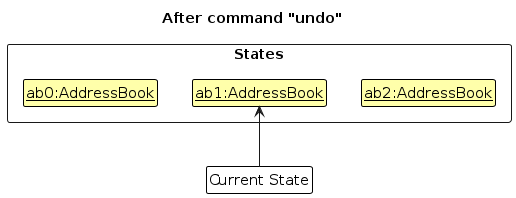
Step 4. The user now decides that adding the person was a mistake, and decides to undo that action by executing the undo command. The undo command will call Model#undoAddressBook(), which will shift the currentStatePointer once to the left, pointing it to the previous address book state, and restores the address book to that state.
Note: If the currentStatePointer is at index 0, pointing to the initial AddressBook state, then there are no previous AddressBook states to restore. The undo command uses Model#canUndoAddressBook() to check if this is the case. If so, it will return an error to the user rather
than attempting to perform the undo.
The following sequence diagram shows how an undo operation goes through the Logic component:
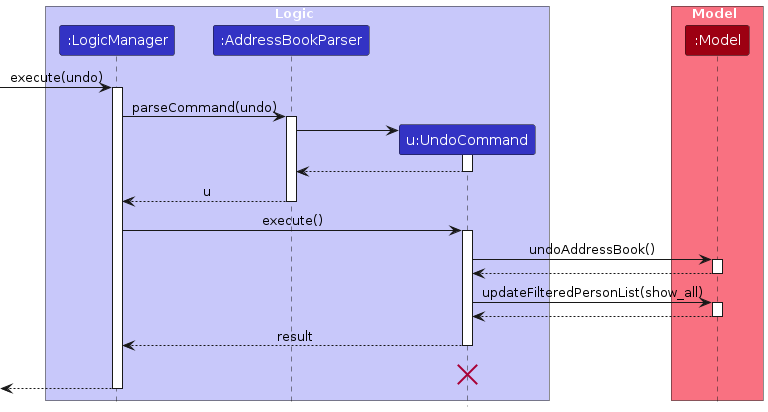
Note: The lifeline for UndoCommand should end at the destroy marker (X) but due to a limitation of PlantUML, the lifeline reaches the end of diagram.
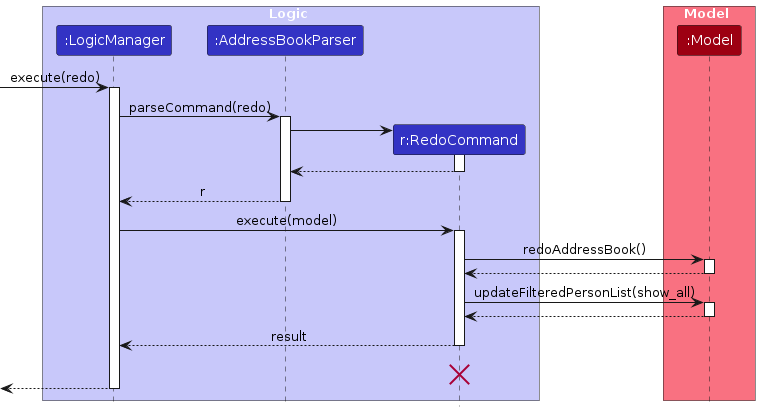
The following sequence diagram shows how a redo operation goes through the Logic component instead:
Similarly, how an undo operation goes through the Model component is shown below:
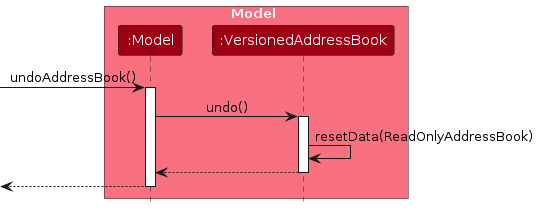
The redo command does the opposite — it calls Model#redoAddressBook(), which shifts the currentStatePointer once to the right, pointing to the previously undone state, and restores the address book to that state.
Note: If the currentStatePointer is at index addressBookStateList.size() - 1, pointing to the latest address book state, then there are no undone AddressBook states to restore. The redo command uses Model#canRedoAddressBook() to check if this is the case. If so, it will return an error to the user rather than attempting to perform the redo.
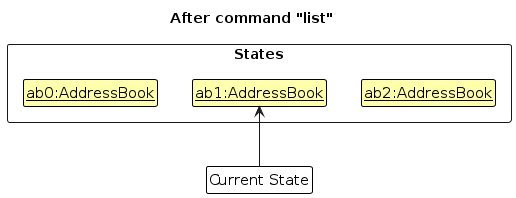
Step 5. The user then decides to execute the command list. Commands that do not modify the address book, such as list, will usually not call Model#commitAddressBook(), Model#undoAddressBook() or Model#redoAddressBook(). Thus, the addressBookStateList remains unchanged.
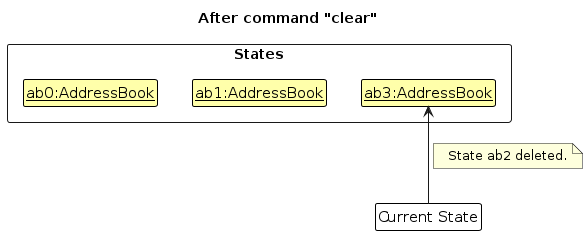
Step 6. The user executes clear, which calls Model#commitAddressBook(). Since the currentStatePointer is not pointing at the end of the addressBookStateList, all address book states after the currentStatePointer will be purged. Reason: It no longer makes sense to redo the add n/David … command. This is the behavior that most modern desktop applications follow.
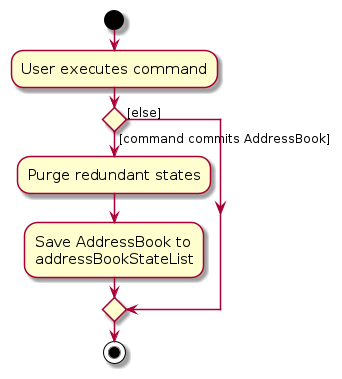
The following activity diagram summarizes what happens when a user executes a new command:
Design considerations:
Aspect: How undo & redo executes:
Alternative 1 (current choice): Saves the entire address book.
- Pros: Easy to implement.
- Cons: May have performance issues in terms of memory usage.
Alternative 2: Individual command knows how to undo/redo by itself.
- Pros: Will use less memory (e.g. for
delete, just save the person being deleted). - Cons: We must ensure that the implementation of each individual command are correct.
- Pros: Will use less memory (e.g. for
Client Status
Implementation
The client status feature is facilitated by the ClientStatus attribute of each Person.
ClientStatus uses the Status Enumeration to record the status of the Person.
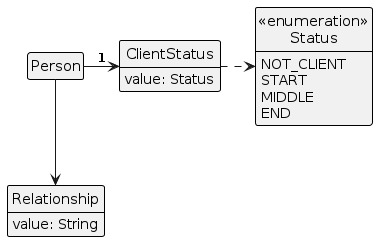
The Status Enum has 4 values:
NOT_CLIENT— APersonwho is a partner can only have this value which cannot be changed.START— The minimum value for a client. All new clients will start with this value by default.MIDDLE— The middle value for a client.END— The maximum value for a client.
ClientStatus implements the following relevant methods:
initNotClientStatus()— Returns aClientStatusthat does not have a level. Only to be used for partners.initClientStatus()— Returns aClientStatusthat has the lowest level. Only to be used for clients.getStatus()— Returns the ordinal of theStatusenum.increment()— Returns a newClientStatuswith one value higher, up to the maximum valueEND.decrement()— Returns a newClientStatuswith one value lower, up to the minimum valueSTART.canIncrement()— Checks if theClientStatuscan be incremented.canDecrement()— Checks if theClientStatuscan be decremented.
The following class diagram shows the ClientStatus and Status classes in relation with Person. Other classes associated with Person are omitted for clarity.
Given below is an example usage scenario and how the client status feature behaves at each step.
Step 1: The user executes add n/David ... r/client to add a new client. Since the relationship is a client, the new
person will be created with a ClientStatus that has value START.
Step 2: Assuming the person the user just added is the first person, the user executes status 1 s/up to increment the status.
The value of Status that ClientStatus holds will now be incremented to MIDDLE.
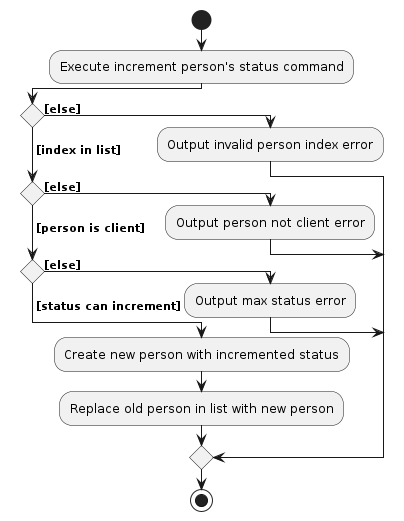
The following activity diagrams summarise what happens when the user attempts to increment and decrement a person's status.
Design considerations:
Aspect: If ClientStatus should exist for partners:
Alternative 1 (current choice): Partners have a
ClientStatus, but the value is unique and cannot be changed.- Pros: Easy to implement, less change required to other parts of the model.
- Cons: Less accurate to real-life model where partners would not have a client status.
Alternative 2:
ClientStatusis wrapped in anOptionalso partners will not have a validClientStatus.- Pros: More accurate to real-life model.
- Cons: More challenging to implement, and may result in more bugs.
Aspect: How the values of status are stored:
- Alternative 1 (current choice):
StatusEnum withinClientStatus- Pros: Easy to implement and keep track, more extensible for future use.
- Cons: Additional layer of abstraction.
- Alternative 2: Use integers/strings to store values.
- Pros: Everything contained in one class.
- Cons: Less extensible, more prone to errors if inputs are not constrained.
Relationship
Implementation
The relationship feature is facilitated by the Relationship attribute of each Person. Relationship class contains a String field that represents the relationship between the user and the person, and it can only be partner or client.
Relationship implements the following relevant methods:
- Relationship(String) — Constructor for relationship which ensures that whether the input is a mix of uppercase and lowercase, it will result in lowercase form. Example: input
ParTNerwill be turned intopartner. - isValidRelationship(String) — Checks if the given relationship is
clientorpartner.
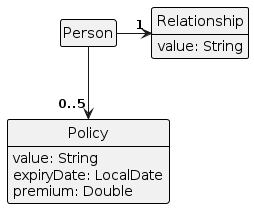
The following class diagram shows the Relationship classes in relation to Person. Other classes associated with Person are omitted for clarity.
Design Considerations:
Aspect: Extensibility and Future Compatibility:
- Alternative 1 (current choice): Restrict the relationship options to only "partner" or "client" using a String field with validation checks.
- Pros: Simplified implementation, easy to understand and maintain.
- Cons: Limited flexibility for adding new relationship types in the future, may require changes to the data model if new relationship types are introduced.
- Alternative 2: Implement a more flexible relationship system using a predefined set of relationship types stored in an enum or database table. This allows for easier addition of new relationship types without modifying the codebase.
- Pros: Improved extensibility, easier to accommodate future changes or additions to relationship types.
- Cons: Increased complexity in implementation, potential overhead in managing a larger set of relationship types.
- Alternative 3: Introduce a relationship hierarchy where relationships can have parent-child relationships. For example, "partner" could be a parent relationship with a child relationship such as "spouse" or "domestic partner".
- Pros: More granular control over relationship types, and supports complex relationship structures.
- Cons: Increased complexity in implementation and management, the potential for confusion in understanding relationship hierarchies.
Find feature
Implementation
The find feature is facilitated by NameContainsKeywordPredicate, PolicyContainsKeywordPredicate, RelationshipContainsKeywordPredicate and TagContainsKeywordPredicate. It extends Predicate which searches through all the contact lists with the given keyword provided with respect to the prefix.
All four classes implement the following relevant methods:
NameContainsKeywordPredicate#test(Person)— Checks if any of the names associated with a person contain any of the specified keywords.PolicyContainsKeywordPredicate#test(Person)— Checks if any of the policies associated with a person contain any of the specified keywords.RelationshipContainsKeywordPredicate#test(Person)— Checks if any of the relationships associated with a person contain any of the specified keywords.TagContainsKeywordPredicate#test(Person)— Checks if any of the tags associated with a person contain any of the specified keywords.
Given below is an example usage scenario and how the find feature behaves at each step.
Step 1: The user executes find n/Alice n/Bob to find those persons containing these names in the contact list. The contact list will now list out all the people with names contain Alice or Bob.
Step 2: The user then decides to find his client, therefore he decides to find based on relationship by executing the command find r/client. Now, the contact list will list all the clients.
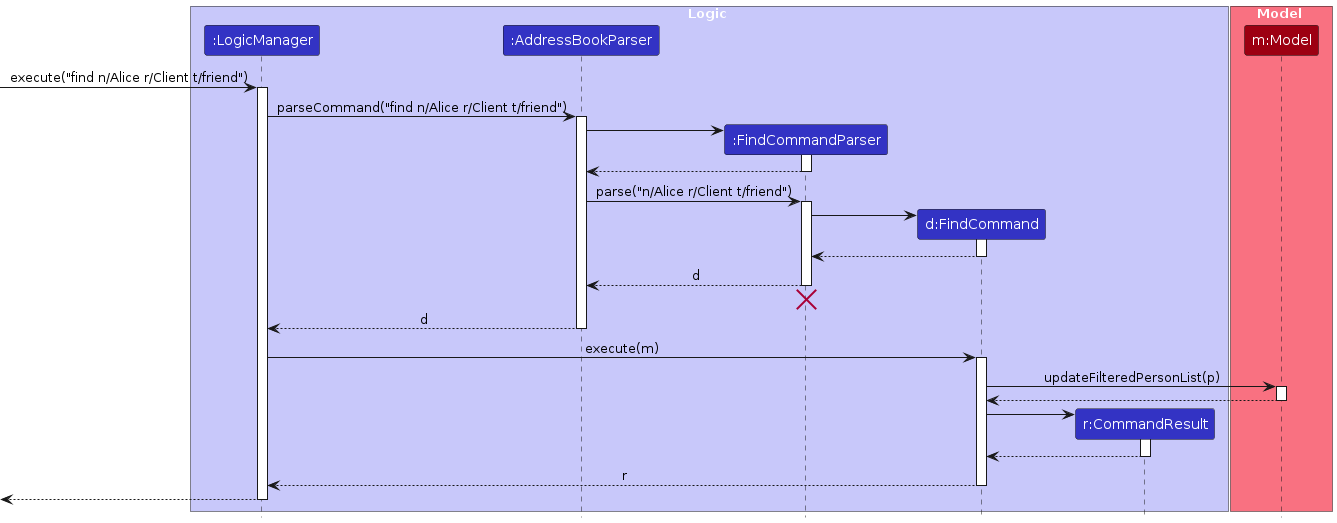
Step 3: Instead of finding persons based on one attribute, the user decides to find persons with multiple attributes. He executes the command find n/Alice r/client t/friend. Any of the persons in the contact list that fulfill one of these keywords based on the prefix will be listed out.
The following sequence diagram shows how the find command goes through the Logic component:
Design considerations:
Aspect: Search Precision and Customization:
- Alternative 1 (current choice): Implement separate predicates for different search criteria (name, policy, relationship, tag), allowing users to customize their search based on specific attributes.
- Pros: Provides precise control over search criteria, and enables users to target specific attributes for more focused searches.
- Cons: Increased complexity with multiple classes, the potential for confusion if users are not familiar with the available search options.
- Alternative 2: Use a single, generic predicate for searching all attributes simultaneously, without differentiation between attributes.
- Pros: Simplified implementation, easier for users to perform general searches without specifying attribute types.
- Cons: Less precise search results, may return irrelevant matches if keywords are found in multiple attributes.
- Alternative 3: Allow users to specify custom search criteria by combining different predicates dynamically. For example, users could specify a combination of name and relationship predicates to find clients with specific names.
- Pros: Maximizes flexibility and customization options for users, and allows for complex search scenarios.
- Cons: Increased complexity in usage, the potential for user errors in specifying custom search criteria.
Policy
Implementation
The policy feature is facilitated by the Policy attribute of each Person. Policy class keeps track of three values which are value, expiryDate and premium. Policy consists of two constructors which enable expiryDate and premium to be optional. The default values of expiryDate and premium are null and 0 respectively.
value— AStringtype that contains the name of the policy.expiryDate— ALocalDatetype that records the expiryDate of the policy.premium— ADoubletype that holds the premium value of the policy.
Policy implements the following relevant methods:
Policy(String)— Constructor for policy without expiryDate and premium, both values will be set as default.Policy(String, LocalDate, double)— Constructor for policy with expiryDate and premium value.isValidExpiryDate(LocalDate)— Checks if the given expiryDate is a valid expiry date.isValidPremium(double)— Checks if the given premium is a valid premium.
The following class diagram shows the Policy classes in relation to Person. Other classes associated with Person are omitted for clarity. Only client relationships can hold policies and have a series of actions to them.
Given below is an example usage scenario and how the policy feature behaves at each step.
Step 1: The user executes add n/David ... r/client to add a new policy. Since the relationship is a client, the person is allowed to add policies. The new person will have an empty policy in default.
Step 2: Assuming the person the user just added is the first person, the user executes policy 1 po/Policy ABC to add the policy. The person now holds one policy which is named Policy XYZ and doesn't contain any expiryDate and premium.
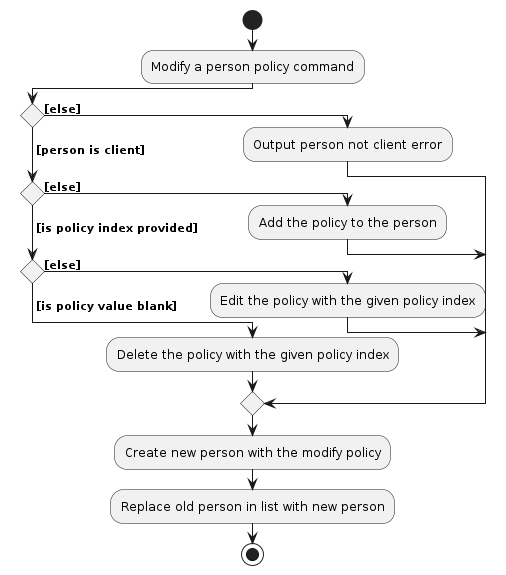
Note: The action (add, edit or delete) depends on the user input. Add action input doesn't need to be accompanied by a policy index, the other two values are optional. Edit action input needs to contain policy index and policy value, the other two values are optional. Delete action input needs to contain the policy index and leave blank for policy value.
The following sequence diagrams show how the policy command goes through the Logic component:
The following activity diagrams summarise what happens when the user attempts to add, edit or delete a person's policy
Design considerations:
Aspect: Persistence of Policy Data:
- Alternative 1 (current choice): Store policy data directly within the Person class.
- Pros: Simplified data structure, easier to access policy information.
- Cons: Tight coupling between Person and Policy, potential scalability issues with large datasets.
- Alternative 2: Implement a separate database table for policies linked to persons.
- Pros: Better separation of concerns, and improved scalability.
- Cons: Increased complexity in database queries and maintenance, potential performance overhead.
Aspect: Policy Validation and Enforcement:
- Alternative 1 (current choice): Implement validation checks within the Policy class to ensure that expiry dates are in the future and premium values are non-negative.
- Pros: Centralized validation logic, easier to maintain and update.
- Cons: Limited flexibility for custom validation rules, the potential for increased complexity as validation rules evolve.
- Alternative 2: Implement a separate policy validation service that encapsulates validation logic for policies. This service can be injected into the Policy class or used externally to validate policies before they are added or updated.
- Pros: Separation of concerns, allows for more flexible validation rules and customization.
- Cons: Increased complexity due to the need for additional service integration and potential overhead.
- Alternative 3: Use a validation framework or library (e.g., Java Bean Validation) to annotate policy attributes with validation constraints. These annotations can enforce validation rules automatically based on predefined constraints.
- Pros: Standardized approach to validation, reduces boilerplate code, supports complex validation rules.
- Cons: Dependency on external libraries, less control over validation logic compared to custom implementations.
Meeting
Implementation
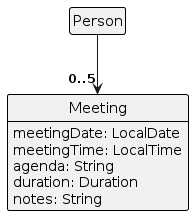
The meeting feature is supported by the Meeting class, which is associated with the Person class. A Person can have multiple meetings, managed through a UniqueMeetingList that ensures no duplicate meetings are associated with a person.
Each Meeting contains:
meetingDate— aLocalDateobject representing the date of the meeting.meetingTime— aLocalTimeobject representing the time when the meeting starts.duration— anintrepresenting the duration of the meeting in minutes.agenda— aStringdetailing the agenda of the meeting.notes— an optionalStringfor additional notes about the meeting.
Key functionalities provided by the meeting feature include scheduling, rescheduling, and canceling meetings. These are executed by the ScheduleCommand, RescheduleCommand, and CancelCommand classes, respectively.
Meeting interacts with the Model to ensure that the added meeting does not conflict with existing meetings for a person. This is done using Model#hasMeeting and Model#getFilteredMeetingList.
Here is a class diagram that shows the relationship between Person and Meeting:
An example usage scenario for scheduling a meeting is as follows:
Step 1: The user launches the application and the Ui loads up.
Step 2: The user inputs a command to schedule a meeting with a specific person in the list using the schedule command.
Step 3: The LogicManager takes the user input and parses it using ScheduleCommandParser, which in turn creates a ScheduleCommand object.
Step 4: ScheduleCommand#execute is called, which attempts to create a new Meeting and add it to the person specified.
Step 5: The Model checks if the meeting conflicts with any existing meetings for that person.
Step 6: If no conflicts are found, the new meeting is added, and the display is updated accordingly.
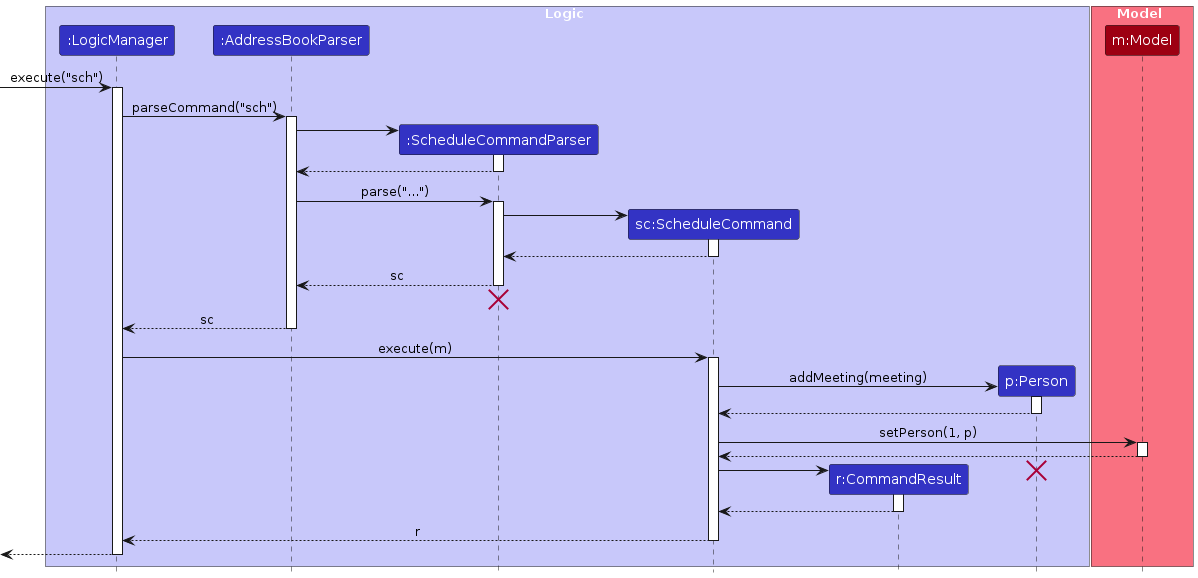
The sequence diagram below shows how the schedule command works within the Logic component using the API call schedule 1 md/2024-05-05 mt/09:00 ma/Discuss health policy mdur/60:
To shorten the names to improve readability, the parameters for the execute as well as the parse commands are the same as the API call.
For parse, it is 1 md/2024-05-05 mt/09:00 ma/Discuss health policy mdur/60 while for createMeeting, it is md/2024-05-05, mt/09:00, ma/Discuss health policy, mdur/60
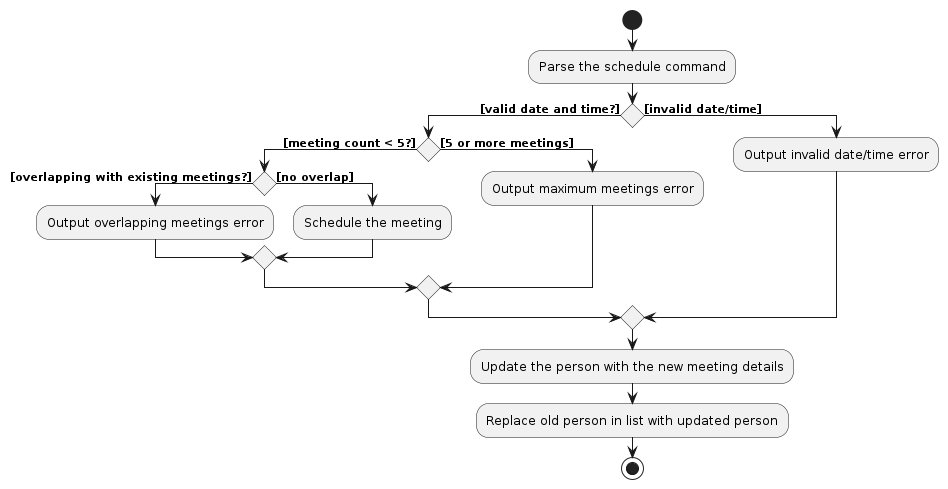
The activity diagram below summarizes the process of scheduling a meeting:
Design considerations:
Aspect: Handling of Meeting Overlaps
- Alternative 1 (current choice): Meetings are strictly non-overlapping.
- Pros: Simple rule that is easy to understand and implement.
- Cons: Does not allow for flexibility in scheduling back-to-back meetings.
- Alternative 2: Allow overlapping meetings but provide warnings to users.
- Pros: More flexibility in scheduling, can accommodate back-to-back meetings.
- Cons: Increased complexity in the system, potential for user confusion.
Aspect: Managing Meeting Lifecycle
- Alternative 1 (current choice): Automatically delete past meetings.
- Pros: Keeps the system clean and focused on future events.
- Cons: Users lose the history of past meetings which might be needed for reference.
- Alternative 2: Keep past meetings and provide a mechanism to archive them.
- Pros: Retains meeting history for records and future reference.
- Cons: Might lead to clutter and require additional features to manage the archive.
Reschedule meeting implementation
The RescheduleMeetingCommand is facilitated by the meeting attribute of each person.
It also has the parser RescheduleMeetingCommandParser that takes in the user input and parses the index as well as relevant meeting prefixes,
meeting index, meeting date and meeting time.
It has the key functionality Person#rescheduleMeeting() that uses the meeting parameters provided to
RescheduleMeetingCommand from RescheduleMeetingCommandParser. First Person#rescheduleMeeting() removes the meeting at the index,
then calls Person#isOverlapWithOtherMeetings() to check for overlaps with its meeting list. If there is an overlap then it will add back the previous meeting and throw an exception.
Given below is example usage scenario and how the reschedule feature behaves at each step.
- The user has the existing meeting with the first person in the list at 1pm 1st september 2024.
- The user executes
reschedule 1 mi/1 md/2024-06-06 mt/09:00to reschedule a meeting with the first person in the list to 9am 6th June 2024. - The
Logic Managerwould then call theAddressBookParser#parseCommandwhich would call theRescheduleMeetingCommandParserwhich would parse the inputs - This in turn returns the
RescheduleMeetingCommandwhich would then be executed. - Executing the
RescheduleMeetingCommandwould then create a meeting with the person then it will callPerson#rescheduleMeeting()as listed above which will then create a new meeting list with the rescheduled meeting. - Lastly, it causes the model to be updated with the new meeting list for the person and also returns the command result which would then be shown.
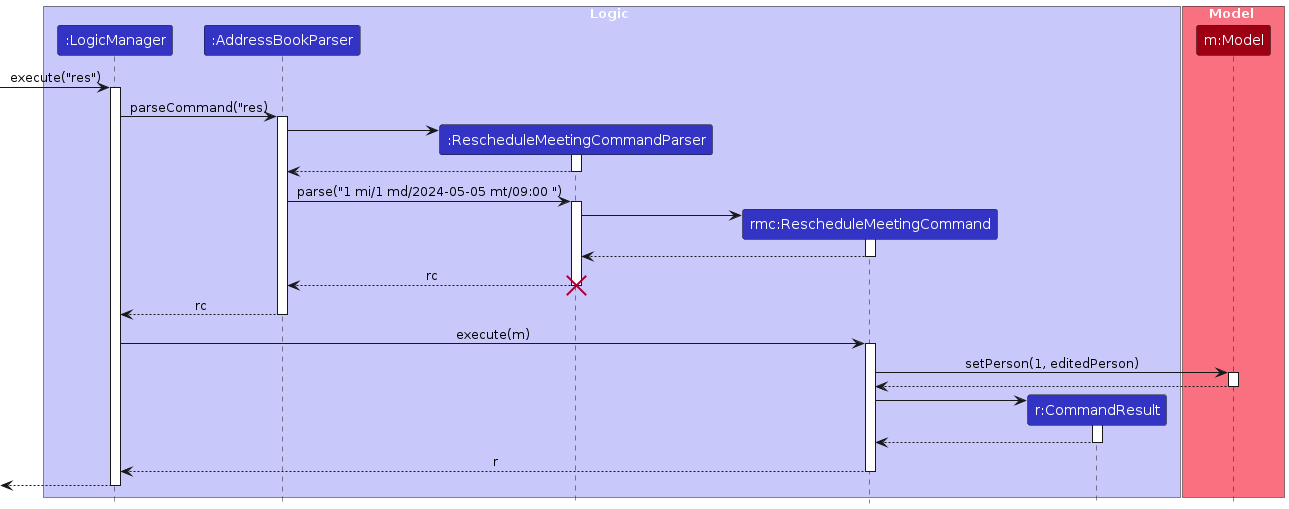
The sequence diagram below illustrates the interactions within the Logic component with execute("reschedule 1 mi/1 md/2024-05-05 mt/09:00") API call as an example.
Design considerations
Aspect: Handling of editing other components in meeting
- Alternative 1 (current choice): Reschedule meetings strictly only work with date and time, not including the other factors.
- Pros: Intuitive in terms of rescheduling command name.
- Cons: Users that want to modify other parts of meeting need to delete the current meeting and add another meeting with the modified details.
- Alternative 2: Allow reschedule to edit all components of meeting.
- Pros: More flexibility in rescheduling, easily modify all parts of meeting.
- Cons: Might lead to more complex defensive coding to ensure that nothing will go wrong.
- Alternative 3: Allow edit to edit meetings as well.
- Pros: Consistency as edit would allow to edit every feature.
- Cons: Increased complexity as well as hard to test to ensure that it is error free.
Cancel meeting implementation
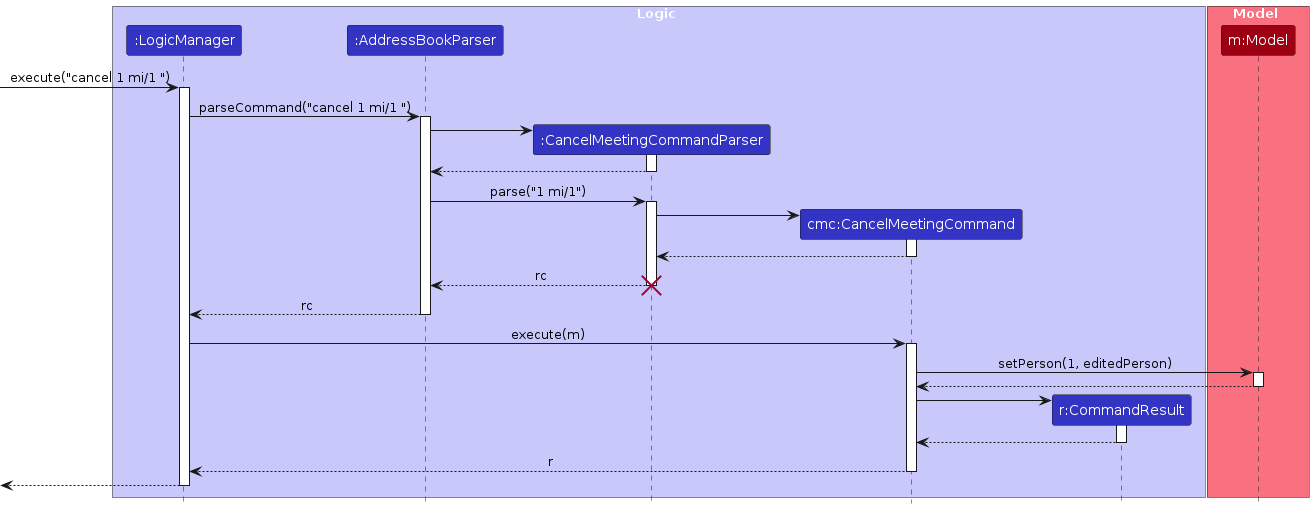
The sequence diagram below illustrates the interactions within the Logic component with execute("cancel 1 mi/1) API call as an example.
Date and Time parsing
The meeting date and time allows multiple formats to be entered, allow both classical formats as well as day of week formats.
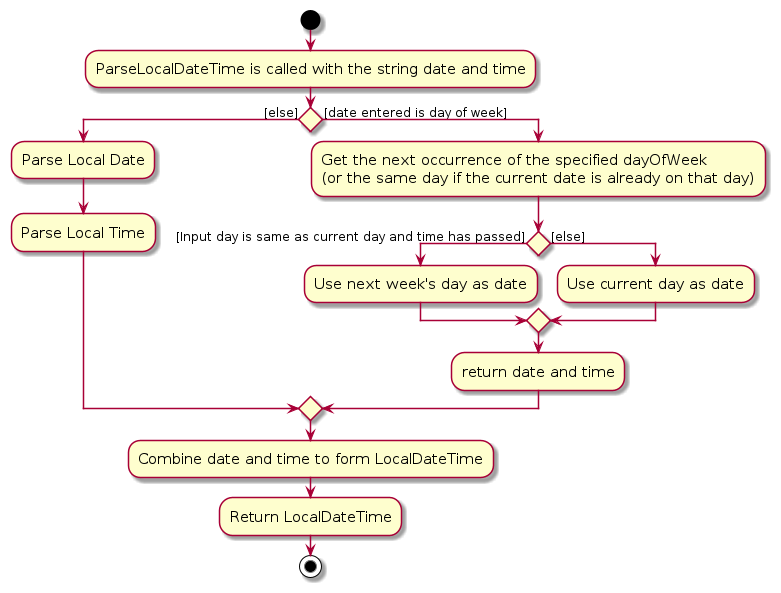
Here is an activity diagram below to illustrate what happens after a meeting date and time is entered and about to be parsed.
- RescheduleCommand calls the parseLocalDateTime function in parserUtil with the string date and time.
- parseLocalDateTime checks if the date provided is a day of week.
- If it is not a day of week, it then calls parseDate with the string date which returns the LocalDate.
- It will then call the parseTime with the string time which returns the LocalTime.
- Else, if the input date is a day of week, it first gets the day of week from the multiple formats available.
- Get the next occurrence of the specified dayOfWeek (or the same day if the current date is already on that day)
- Checks if input date and current date is the same, if so, checks if input time has passed current time to select the next occurrence of the input day and time.
- If the current time has not passed, then the next occurrence of the input date will be the current day and time, otherwise, it will be next week's day and time.
- the LocalDateTime of the meeting is then returned back to the RescheduleCommand.
[Proposed] Data archiving
{Explain here how the data archiving feature will be implemented}
Documentation, logging, testing, configuration, dev-ops
Appendix: Requirements
Product scope
Target user profile:
- insurance agents
- has a need to manage a significant number of contacts
- needs to differentiate between different types of contacts
- track the status of contacts
- prefer desktop apps over other types
- can type fast
- prefers typing to mouse interactions
- is reasonably comfortable using CLI apps
Value proposition: Provides fast access to client contact details, easily manage client relationships, collaborate with industry partners, and stay organised in a fast-paced industry.
User stories
Priorities: High (must have) - * * *, Medium (nice to have) - * *, Low (unlikely to have) - *
| Priority | As a… | I want to… | So that I can… |
|---|---|---|---|
* * * | fast typing user | have a CLI | use the app more efficiently |
* * * | busy user | clear all my data quickly | quickly restart a new list of contacts |
* * * | intermediate user | see my relationship with my contacts | know who they are |
* * * | intermediate user | find a certain client based on a keyword | easier to find the client |
* * * | intermediate user | save and retrieve information | use the app in multiple sessions |
* * * | intermediate user | add data about clients to the application | record information about my client |
* * | exploring the app | see what the app will look like with sample data | more easily understand the potential features |
* * | exploring the app | have a tutorial of the basic features | get started with using the app |
* * | exploring the app | access a help page with basic commands | familiarize myself with how to use the app |
* * | exploring the app | track my client information | manage my work using the app more efficiently |
* * | exploring the app | access past activity since app installation | see my current progress |
* * | intermediate user | save similar client information data into a group | manage them easily |
* * | intermediate user | reorganize my list of contacts | access them more clearly and efficiently |
* * | intermediate user | edit my contacts as a group | easier to implement changes if something in common in the group changes |
* * | careless user | have an undo command | prevent doing some mistake |
* * | intermediate user | filter client information | sort my client information according to some condition |
* | intermediate user | record if I am successful in securing an agreement | know I have succeeded at my job |
* | busy user | autocomplete my commands | type commands faster |
* | intermediate user | tag my clients | classify common groups |
* | intermediate user | have common use shortcut keys command | access the app more efficiently |
* | intermediate user | track progress of engagements via tags | monitor the progress of different engagements with clients |
* | intermediate user | copy information/features to another client | reduce the time used |
* | intermediate user | quickly differentiate between clients and business partners | differentiate between them |
* | intermediate user | rate clients for effective feedback | provide feedback efficiently |
* | intermediate user | customize the app’s theme | better suits my preferences |
* | expert user | create shortcuts for tasks | save time on frequently performed tasks |
* | long-time user | archive/hide unused data | not distracted by irrelevant data |
* | frequent user | have templates for adding contacts | contacts are standardized and easier to read |
* | frequent user | schedule weekly check-ins with clients | do not forget about them |
* | expert user | have reminders for meetings with clients | organize and plan my time well |
* | expert user | create automated task workflows | save time on performing repeated tasks |
* | expert user | see a competency rating based on past successes | know if I need to improve |
* | expert user | find clients based on different filters | better focus on one particular group |
* | expert user | disable unnecessary features | the application is more customized and simpler to use |
Use Cases for InsuraConnect
(For all use cases below, the System is InsuraConnect and the Actor is the user, unless specified otherwise)
Use case: Delete a client/partner
MSS
User requests to list clients/partners.
InsuraConnect shows a list of clients/partners.
User requests to delete a specific client/partner in the list.
InsuraConnect deletes the client/partner.
Use case ends.
Extensions
2a. The list is empty.
Use case ends.
3a. The given index is invalid.
3a1. InsuraConnect shows an error message.
Use case resumes at step 2.
Use case: List out contact information
MSS
User requests to list clients/partners.
InsuraConnect shows a list of clients/partners.
Use case ends.
Extensions
2a. The list is empty.
Use case ends.
Use case: Filter the list of clients
MSS
User requests to filter list of clients/partners based on certain criteria.
InsuraConnect shows a list of clients/partners that satisfy the filter criteria.
Use case ends.
Extensions
2a. The filtered list is empty.
Use case ends.
Use case: Add a new client/partner
MSS
User requests to add a new client/partner.
InsuraConnect prompts the user to enter the details of the client/partner.
User enters the details of the client/partner.
InsuraConnect adds the new client/partner to the list.
Use case ends.
Extensions
3a. The user enters invalid details.
3a1. InsuraConnect shows an error message.
3a2. InsuraConnect prompts the user to enter the details again.
Use case resumes at step 3.
Use case: Update a client/partner's details
MSS
User requests to list clients/partners.
InsuraConnect shows a list of clients/partners.
User requests to update the details of a specific client/partner in the list.
InsuraConnect prompts the user to enter the new details.
User enters the new details.
InsuraConnect updates the client/partner's details.
Use case ends.
Extensions
2a. The list is empty.
Use case ends.
3a. The given index is invalid.
3a1. InsuraConnect shows an error message.
Use case resumes at step 2.
5a. The user enters invalid details.
5a1. InsuraConnect shows an error message.
5a2. InsuraConnect prompts the user to enter the details again.
Use case resumes at step 4.
Use case: Clear InsuraConnect
MSS
User requests to clear InsuraConnect.
InsuraConnect confirms the action with the user.
Upon confirmation, InsuraConnect clears all data and shows an empty list.
Use case ends.
Use case: Schedule a meeting with a client
MSS
User requests to schedule a meeting with a client.
InsuraConnect prompts the user to enter the meeting details.
User enters the meeting details including date, time, and agenda.
InsuraConnect schedules the meeting and updates the client's record.
Use case ends.
Extensions
3a. The user enters invalid or past dates/times.
3a1. InsuraConnect shows an error message about invalid date/time.
3a2. InsuraConnect prompts the user to enter the details again.
Use case resumes at step 3.
3b. The scheduled meeting overlaps with an existing meeting.
3b1. InsuraConnect shows an error message about the overlap.
3b2. InsuraConnect prompts the user to reschedule the meeting.
Use case resumes at step 3.
Use case: Manage policies for a client
MSS
User chooses to manage policies for a selected client.
InsuraConnect prompts the user to add, update, or delete policies.
User provides details for the policy action they wish to perform.
InsuraConnect executes the action on the policies (add, update, or delete) and updates the client's record.
Use case ends.
Extensions
3a. The user enters invalid policy details (e.g., negative premium, past expiry date).
3a1. InsuraConnect shows an error message.
3a2. InsuraConnect prompts the user to enter the details again.
Use case resumes at step 3.
3b. The user attempts to add more policies than the maximum allowed.
3b1. InsuraConnect shows an error message about the policy limit.
3b2. InsuraConnect prompts the user to update or remove existing policies.
Use case resumes at step 3.
Use case: Update meeting details
MSS
User requests to update an existing meeting with a client.
InsuraConnect shows current meeting details and prompts for changes.
User enters new meeting details.
InsuraConnect updates the meeting details in the client's record.
Use case ends.
Extensions
3a. User enters invalid new meeting details.
3a1. InsuraConnect shows an error message.
3a2. InsuraConnect prompts the user to enter the correct details again.
Use case resumes at step 3.
Use case: Cancel a scheduled meeting
MSS
User requests to cancel a scheduled meeting.
InsuraConnect prompts for confirmation to cancel the meeting.
User confirms the cancellation.
InsuraConnect removes the meeting from the client’s record.
Use case ends.
Extensions
3a. User decides not to cancel the meeting after all.
3a1. InsuraConnect does not cancel the meeting.
Use case ends.
Non-Functional Requirements
- Should work on any mainstream OS as long as it has Java
11or above installed. - Should be able to hold up to 1000 persons without a noticeable sluggishness in performance for typical usage.
- A user with above average typing speed for regular English text (i.e. not code, not system admin commands) should be able to accomplish most of the tasks faster using commands than using the mouse.
- The response to any use action should become visible within 5 seconds.
- Should have a user-friendly interface that is easy to navigate and understand.
- Should be stable and not crash or lose data under normal use.
- Should be able to handle increasing amounts of data and users without significant degradation in performance (Scalability).
- Should protect sensitive data and prevent unauthorized access, ensuring data integrity and confidentiality (Security).
- Should be easy to maintain, with clear documentation and a modular design that allows for easy updates and fixes.
- Should be accessible to users with disabilities, following guidelines such as the Web Content Accessibility Guidelines (WCAG).
{More to be added}
Glossary
- Mainstream OS: Windows, Linux, Unix, MacOS
- Private contact detail: A contact detail that is not meant to be shared with others
Appendix: Instructions for manual testing
Given below are instructions to test the app manually.
Note: These instructions only provide a starting point for testers to work on; testers are expected to do more exploratory testing.
Launch and shutdown
Initial launch
Download the jar file and copy into an empty folder
Double-click the jar file Expected: Shows the GUI with a set of sample contacts. The window size may not be optimum.
Saving window preferences
Resize the window to an optimum size. Move the window to a different location. Close the window.
Re-launch the app by double-clicking the jar file.
Expected: The most recent window size and location is retained.
{ more test cases … }
Deleting a person
Deleting a person while all persons are being shown
Prerequisites: List all persons using the
listcommand. Multiple persons in the list.Test case:
delete 1
Expected: First contact is deleted from the list. Details of the deleted contact shown in the status message. Timestamp in the status bar is updated.Test case:
delete 0
Expected: No person is deleted. Error details shown in the status message. Status bar remains the same.Other incorrect delete commands to try:
delete,delete x,...(where x is larger than the list size)
Expected: Similar to previous.
{ more test cases … }
Changing a client's status
Incrementing a client's status
Prerequisites: List at least one client using the
listorfindcommand. The first person should be a client and the status should beYet to start.Test case:
status 1 s/up
Expected: Client status of the first person is updated toIn progress. Details of the person shown in the status message. In the progress bar, the value forYet to startdecreased by 1 and the value forIn progressincrease by 1.Test case:
status 0 s/up
Expected: No person is changed. Error details shown in the status message. Progress bar remains the same.Test case:
status 1 s/right
Expected: No person is changed. Error details shown in the status message. Progress bar remains the same.Other incorrect status commands to try:
status,status x s/up,...(where x is larger than the list size)
Expected: Similar to previous.
Resetting a client's status
Prerequisites: List at least one client using the
listorfindcommand. The first person should be a client.Test case:
status 1 s/
Expected: Client status of the first person is reset toYet to start. Details of the person shown in the status message. In the progress bar, the value forYet to startincreased by 1 if the person's previous status was notYet to start.Test case:
status 0 s/
Expected: No person is changed. Error details shown in the status message. Progress bar remains the same.Other incorrect status commands to try:
status s/,status x s/,...(where x is larger than the list size)
Expected: Similar to previous.
Adding a policy
Adding a policy to a person while all persons are being shown
Prerequisites: List all persons using the list command. Multiple persons in the list.
Test case:
policy 1 po/Policy ABC
Expected: Add a policy namedPolicy ABCto the first person. Details of the edited contact are shown in the status message. The timestamp in the status bar is updated.Test case:
policy 0 po/Policy ABC
Expected: No person added the policy given. Error details are shown in the status message. The status bar remains the same.Other incorrect adding policy commands to try:
policy,policy 1 po/,policy x po/Policy ABC(where x is larger than the list size)
Expected: Similar to previous.
{ more test cases … }
Editing a policy
Editing a policy to a person while all persons are being shown
Prerequisites: List all persons using the list command. Multiple persons in the list.
Test case:
policy 1 pi/2 po/Policy ABC
Expected: Edit the policy namedPolicy ABCto the first person. Details of the edited contact are shown in the status message. The timestamp in the status bar is updated.Test case:
policy 1 pi/0 po/Policy ABC
Expected: No person edits the policy given. Error details are shown in the status message. The status bar remains the same.Other incorrect adding policy commands to try:
policy 1 pi/,policy pi/1 po/,policy x pi/y po/Policy ABC(where x is larger than the list size, y is larger than the policy list size)
Expected: Similar to previous.
{ more test cases … }
Deleting a policy
Deleting a policy to a person while all persons are being shown
Prerequisites: List all persons using the list command. Multiple persons in the list.
Test case:
policy 1 pi/2 po/
Expected: Delete the second policy of the first person. Details of the edited contact are shown in the status message. The timestamp in the status bar is updated.Test case:
policy 1 pi/0 po/
Expected: No person deletes the policy. Error details are shown in the status message. The status bar remains the same.Other incorrect adding policy commands to try:
policy x pi/y po/(where x is larger than the list size, y is larger than the policy list size)
Expected: Similar to previous.
{ more test cases … }
Scheduling and rescheduling meetings
Adding multiple meetings to a single contact resulting in the sorted meeting list. Tests both scheduling meetings and rescheduling meetings as well
Prerequisites: Have only a single person in the list and the person has no meetings
Test case:
schedule 1 md/2024-09-09 mt/09:00 mdur/60 ma/discuss health policy
Expected: Adds a meeting to the first person in the list at 9am 9th september 2024Test case:
schedule 1 md/2024-09-09 mt/13:00 mdur/60 ma/discuss health policy again
Expected: Adds another meeting to the person, and this meeting will be below the initial meetingTest case:
reschedule 1 mi/2 md/2024-09-09 mt/08:00
Expected: The initial meeting at 1pm that is rescheduled to 8am will now be above the 9am meeting.
Adding more than the 5th meeting to a person results in error message
Prerequisites: Have only a single person in the list with 5 meetings without overlapping times with the test case
Test case:
schedule 1 md/2024-09-09 mt/09:00 mdur/60 ma/discuss health policyExpected: The meeting won't be added and an error messageCannot have more than 5 meetingswill be shown
Scheduling meeting date using day of week adds the correct day of week
Prerequisites: Have only a single person in the list with no meetings
Test case:
schedule 1 md/Mon mt/09:00 mdur/60 ma/discuss health policyExpected: New meeting will be added at 9am on this Monday or next Monday depending on the time .
{ more test cases … }_
Undo and redo deleting a person
Undo after deleting a person adds back the deleted person while executing redo will delete the person again.
Prerequisites: Have at least a person in the list
Test case:
delete 1
Expected: The first person in the list is deletedTest case:
undo
Expected: The person that was deleted is added backTest case:
redo
Expected: The person that was added back is now deleted againTest case:
redo
Expected: Nothing happens to the list and the command result shows that there is no more commands to redo.
{ more test cases … }
Adding a person
Adding a person to the contact list
Test case:
add n/John Doe p/98765432 e/johnd@example.com a/311, Clementi Ave 2, #02-25 r/client t/friends t/owesMoney
Expected: Add this person to the contact list. Details of the added contact are shown in the status message. The timestamp in the status bar is updated.Test case:
add n/John Doe p/98765432 e/johnd@example.com a/311, Clementi Ave 2, #02-25 r/dummy t/friends t/owesMoney
Expected: No person is added. Error details are shown in the status message. The status bar remains the same.Other incorrect add commands to try:
add n/John Doe,add n/ ...,add n/1234 ...,add
Expected: Similar to previous.
{ more test cases … }
Finding a person
Find a person from the contact list
Test case:
find n/Alex
Expected: List all person that contains the nameAlexin the contact list. Successful message of find command shown in the status message. The timestamp in the status bar is updated.Test case:
find n/
Expected: The contact list remains unchanged. Error details are shown in the status message. The status bar remains the same.Other incorrect add commands to try:
find n/Hans Bo,find,find 123
Expected: Similar to previous.
{ more test cases … }
Saving data
Dealing with missing/corrupted data files
- {explain how to simulate a missing/corrupted file, and the expected behavior}
{ more test cases … }
Appendix: Effort
Difficulty level
We felt that the project was considerably difficult.
We were initially ambitious and wanted to create a product that had multiple different features to solve the different user stories we had.
Even after looking through and only focusing on the most important user stories, the features that we had to implement were still very elaborate and required a lot of time and effort.
At the start, we also did not account for the other requirements such as the User Guide and Developer Guide which also took up time and effort.
Challenges faced
We faced several challenges along the way during the project.
First was quickly understanding how AB3 was structured and how we could add features to it. For most of us, it was our first experience working with such a huge codebase and there were many individual components working together. We had to quickly figure out how to implement our features that had parts in the Logic, Model, and Ui segments. The tutorial provided was helpful, but some of our features had parts that went beyond the scope of the tutorial that we had to find out how to implement ourselves.
We also had to work out the kinks when working in a team and using the GitHub workflow to organise our changes.
We were largely unfamiliar with working with a codebase in a team and so followed the GitHub workflow quite closely to avoid any mishaps.
However, since it was also our first time working together, we made some critical mistakes when trying to merge our code together and had to spend some time trying to resolve these issues.
There were also times when it was difficult to split the workload in a way that our changes would not overwrite what the rest contributed.
Effort required
We feel that we put in a lot of effort over the course of this project.
As our product is tailored towards insurance agents, we had to significantly change the Model component from AB3 which were more for generic people.
We had to define the relationships a person could have, and then build the new fields that each person could have such as Policy and Meeting, where each of them also had their own details to track.
We also significantly updated the UI to be more useful and intuitive for our target users. Creating the additional panels and drop-down functionalities required more advanced JavaFX than AB3 and we spent time and effort to implement it the best way possible.
As our features are also quite advanced, we faced many different bugs close to the end of the project ranging from functionality issues to UI inconsistencies which we had to quickly identify and fix.
Our User Guide and Developer Guide then also added to our workload as we had to explain each feature in depth.
However, we were able to split the workload well and pulled through.
Adapting the undo and redo feature from AB4 helped to ease the workload a bit but still required work in order to implement with our system as well as implement testing with our features.
Achievements
As a result of our efforts, we are proud of being able to create a product which significantly builds upon AB3.
Our features are detailed, useful for our target users and work well together to create a complete product. Most of the user stories that we identified at the start are solved, especially the ones we deem as high priority.
We believe that our UI is very user-friendly and intuitive, and is likely something that is beyond the normal expectations for this course.
While there is still room for improvement, we feel that currently InsuraConnect is a good representation of our efforts thus far.
Appendix: Planned Enhancements
Team size: 4
- Separate the three actions of adding, editing, and deleting policies into three different commands. Currently, the
policycommand handles these three actions, which can be quite confusing for users to differentiate. We plan to create three commands:addpo,editpo, anddelpo, to handle each action clearly. - The current
findcommand can only find the full word based on the prefix. For example,find n/Benwill only list "Ben" and not "Benson." We plan to modify it to accept partial words so that users don't have to input the full word to search for something in the contact list. - Allow special characters in name such as
s/oand also in phone numbers such as+65to allow for country code for international contacts. - Include more stringent validity checks for duplicate contacts by checking against their phone number and emails and address instead of name.